在钉钉/企业微信中接收Excel服务器消息提醒
在Excel服务器的服务端安装目录下,创建一个文本文件,命名为 ServerConfigWS.xml,该文件的初始内容如下:
<?xml version="1.0" encoding="utf-8"?>
<!-- WebService接口配置 -->
<!-- 适用于调用第三方WebService接口发送消息提醒-->
<SendMsgToWS enable="1" logenable="1" logpath="">
<interfaces>
<interface name="WorkItemSubmited">
<ws url="http://127.0.0.1/ESWeb/api/mbopeninterface" namespace ="http://tempuri.org/" protocol="post2webapi" lang="ASP.NET">
<method name="submitwi">
<inparams>
<param i="1" name="wiId" type="string" field="wiId" />
<param i="2" name="db" type="string" field="db" />
</inparams>
<outparams>
<param i="1" name="out" type="int"/>
</outparams>
</method>
</ws>
</interface>
<interface name="reminder">
<ws url="http://127.0.0.1/ESWeb/api/mbopeninterface" namespace ="http://tempuri.org/" protocol="post2webapi" lang="ASP.NET">
<method name="SendReminder">
<inparams>
<param i="1" name="db" type="string" field="db" />
<param i="2" name="uid" type="string" field="rmdUserLogin" />
<param i="3" name="msgTxt" type="string" field="rmdDesc" />
</inparams>
<outparams>
</outparams>
</method>
</ws>
</interface>

</interfaces >
</SendMsgToWS >
默认安装的情况下(即Excel服务器的服务和填报网站安装在同一台机器上),此文件的内容不需要做修改;如果填报网站和服务安装在不同的机器上,要对文件中的两处 "http://127.0.0.1"做修改,改成从服务器访问填报网站时需要输入的协议头和ip地址。
例如,假设Excel服务器的服务安装在一台机器上,填报网站安装在另一台机器(192.168.0.101)上,则在服务所在的机器上若要访问填报网站,需要在网页url 上输入 http://192.168.0.101/esweb,则需要将上述 xml 文件中的 http://127.0.0.1 改成 http://192.168.0.101
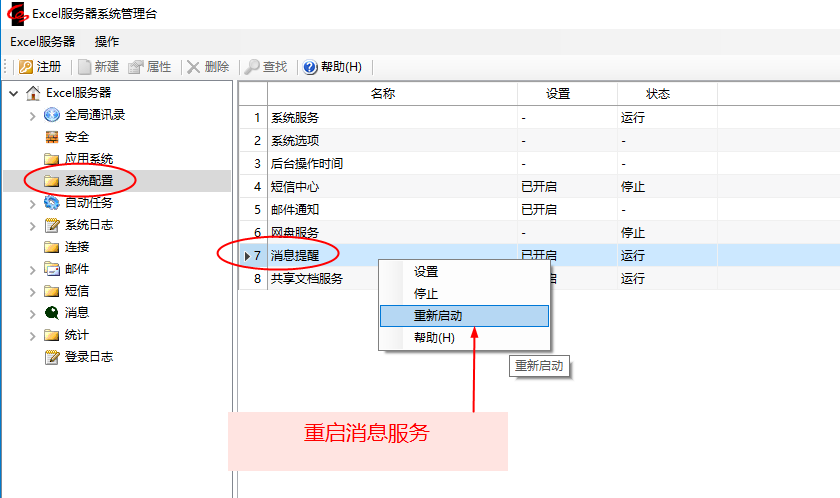
此 xml 文件创建好之后,重启Excel服务器的消息服务,此后用户接到的待办事宜/定时提醒等消息,会同步推送到用户的钉钉/企业微信消息中。